Tiger Road MD: ten days of testing, up to V1.2
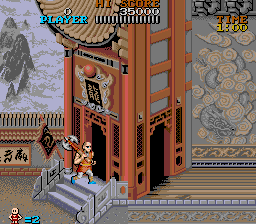
The last ten days have been almost all testing. I play each build on a real Mega Drive and in BlastEm, take photos or screenshots and save states of anything odd, and the fix usually comes back the same day. The boot screen now shows a version number instead of a build date, and today it reads V1.2.
The level 2 mid-boss, the two golden statues, took four evenings. First the game froze completely: the music kept playing and nothing on screen moved. It was a trick to draw the standing statue in the background layer and save sprites, which got stuck in a loop. Then Wong started falling in slow motion during the fight, and when the main statue moved towards Wong, its lower half vanished, because the code hiding its upper arms was matching tile numbers that turned out to be its thighs. After an insane number of tries and tricks and tweaks and test builds, the statue on the right had to go, completely, painted over with wall, and the main one no longer throws projectiles. It was frustrating to come to the conclusion I had to make the cuts, but in the end I'd rather take that over more flickering.
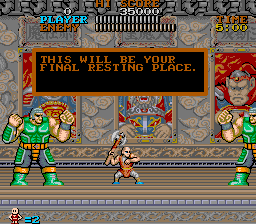
What else? The skull room in level 2 allows two zombies at most, and the skulls breathe half as many fire particles, which took the frames where the game couldn't rebuild its sprite list from 28.5% to almost zero. The green twins in level 5 flickered when they attacked on top of each other. Now the one on the left is always drawn in front, and the code that keeps them under the limit of 16 sprites per line was rewritten in assembly. The intro storm was too slow for its music and went from 584 frames to 472. The arcade does it in 353, so there's still a gap. The black screen after pressing START went from about 153 frames to 56.
Today I spent the afternoon in the yellow crocodile room in level 4. On console it slowed down when jumping between platforms: each head was 15 small sprites and there are usually four of them. Now each head is six bigger Mega Drive sprites, and dropped frames in the room went from 6.8% to 1.7%. Then there was the background flashing as a platform sinks. It's the arcade's own effect, but it looked like a bug when on console, so I simply left the colours fixed instead. It took four builds. One turned the bottom of the blue column grey on the way in, another left the water grey after dying in the room. The one that works saves those three palettes the first time you enter the room in each level and rewrites them every frame.

The other bugs from the last few days, and what caused them:
- After beating Fudo, Wong walked out in front of the wall instead of behind it. The TIME COUNT text switched the foreground layer to text mode. Short texts like that one are now drawn with sprites.
- Crossing some doors in level 4 showed squares with graphics from other rooms. The tile cache ran out of space and freed blocks that were still on screen. In that case the new room now gets the colours that are still available, which may not be as faithful to the arcade but I'll take that over broken graphics.
- The lives counter disappeared in the crocodile room. The bottom lines had too many sprites, and the lives were last in the list. They go first now.
- The flag of the level 4 boss was greyish green instead of yellow and brown, because that stretch of the level shares palettes. Changing four colours fixed it.
- Before the map after that boss, the arcade shows a mosaic of bits of rooms while it switches banks. It seems the arcade does it that way, but it definitely looks like an error to me, so I prefer a black screen there.
Tiger Road MD v1.2 is available on my Itch.Io page. You can follow me on X for more updates!